
Three techniques to validate and learn faster
I’m excited to share this guest article by Chetan Kapoor, a fellow product person I’ve known since my early days as a product manager in Chicago.
This article started when I posted on LinkedIn last year arguing that feature flags are a powerful product operations tool most teams underuse. Chetan jumped into the comments to share the innovative work he’s doing with feature flags at eBay – specifically how his team uses them to accelerate product learning, not just manage deployments.
Most product decisions are made with incomplete data. That’s not a failure – it’s just reality. As product managers, we want to optimize for quickly generating new insights and adjusting course.
Feature flags are one of the most under-utilized product management tools for speeding up our learning.
I’m Chetan Kapoor, Product Leader for Experimentation and Chief Evangelist for Feature Flags at eBay. As a growth hacker, product storyteller and change agent, my mission is simple: unlock eBay’s magical future experience. Previously, I grew a Chicago FinTech’s portfolio from $160M to $650M during my time there—the business has since passed $1B—and honed my technical craft at Expedia as a DevOps engineer. Today, I help teams turn ideas into customer value with speed, safety, and scale.
At eBay, where millions of buyers and sellers interact across hundreds of product categories and dozens of markets globally, the stakes for getting product decisions right are particularly high. We run over 3000 experiments behind feature flags each year.
We believe product velocity matters, and we’ve learned that feature flags are one of the most underrated tools for accelerating the continuous learning loop. They’re not just toggles to launch a feature quietly – they’re infrastructure for discovery, experimentation, and confidence.
We consider them not only a useful tool for engineering, but a critical tool for great product management.
In this article, I’ll walk through:
- The difference between feature flags and A/B tests.
- How teams use feature flags today (and why it’s limited).
- Strategically integrating feature flags into modern product lifecycle.
Feature flags vs. A/B tests
I’ve talked to many product managers who see feature flags and A/B experiments as interchangeable. It’s important to know the differences.
Feature flags and A/B tests both control who sees what, but they serve different purposes. Let’s quickly break down how they relate and where they differ:
Feature Flags are on/off switches in your code that let you control who sees a feature and when, without redeploying. They help product teams test, release, and iterate faster, safer, and more strategically. A/B tests are experiments run on top of feature flag capabilities to compare performance across two variants.
| Feature Flags | A/B Tests | |
| Purpose | Control feature visibility and rollout | Test and learn what performs best |
| Focus | Who sees the feature and when | Which version works better |
| Value | Enables gradual rollouts, instant rollbacks, no-code optimizations, canary release → safer launches | Validates product decisions with data. Examples – comparing UI designs, pricing models, LLMs, etc. |
Feature flags should be used when teams need control over who sees a feature and when: for safer rollouts, gradual ramps, or quick rollback. Here is a simple example:
For example, say you’re rolling out a new “Express Delivery” badge on product pages. A feature flag lets you show it only to a small region first, so you can validate performance, fix bugs, or pause rollout instantly if needed. Even without an A/B test, the flag gives you precise control over exposure, making launches safer and more flexible.
Experiments are used when teams want to measure what works best: validating product decisions with data before going broad. After you’re confident your feature is ready, you can layer on an experiment to measure if the badge increases conversion, without changing the rollout setup.
While experiments are often seen as a tool for learning, most teams treat feature flags purely as a release safeguard. But that approach limits their full potential.
How many teams use feature flags (And Why That’s Not Enough)
Across industries, here’s how I’ve seen most teams use feature flags:
- Toggle ON/OFF to show or hide features
- Control environments (staging vs. pre-prod vs. production)
- Opt-in internal users for dogfooding on production environment
- Target customer segments (based on location, device, user ID, etc.)
- Gradual rollout of features (traffic ramping, data center based release)
To help illustrate this, let’s do a little case study. Meet John*, a PM at eBay working on a new AI-powered payment feature for multiple global markets. The team wants to ship fast, validate quality, and de-risk rollout. Here’s how they use feature flags during product development and delivery:
A sample engineering-oriented feature flag workflow
| Phase of Development | What it is | Feature Flag Toggle | Targeting Configuration |
| Feature Development | Create a new flag and build code safely behind it.Keep the feature invisible. | OFF | N/A (flag is off, not user-visible) |
| Quality Validation (QA) | Engineering validates usability, test coverage, and backend logic in staging. | ON | Staging only, Developers only |
| User Acceptance Testing (UAT) | PM & Designer verify flows, copy, and experience directly in production without exposing to real users. | ON | Limited to PMs & UX team |
| Canary Testing (soft launch) | Gradual rollout to measure funnel impact, early feedback, and performance. Fix friction. | ON | US market only, 5-10% traffic |
| Full Rollout | Monitor potential impact for a few hours or days, as needed | ON | All users in US and UK |
1. Feature Development
John’s engineering team begins by building the new feature safely behind a flag. With the toggle off, the feature is deployed but invisible to users, reducing risk from the start.
2. Quality Validation (QA)
Once the feature is in place, developers validate usability, test coverage, and backend logic. The flag is flipped ON in the staging environment only for developers, catching issues earlier without user impact.
3. User Acceptance Testing (UAT)
Next, John and his designer test flows, language, and responsiveness in production using targeted flags. Only their accounts can see the feature, ensuring feedback without exposure to customers.
4. Canary Testing (Soft Launch)
Confident in the basics, John enables the feature for a small slice (e.g., 5% of U.S. shoppers). This allows monitoring of funnel metrics, engagement, and performance under real conditions before broader rollout.
5. Full Rollout
Finally, with validated demand and stable performance, the team enables the feature for 100% of users in the US and UK. A final round of monitoring for guardrails (critical business and engineering watch-metrics) is in place to catch any last-minute surprises, but by this point, risks are minimal.
These are great for reducing risk, but it’s not helping John and the team learn more about their feature. What he’s missing is using feature flags as a product discovery tool, not just a release safeguard.
The real unlock is when feature flags are used earlier in the process, during product discovery itself.
3 Ways to use feature flags in product discovery
Let’s go back to John at eBay. He’s been tasked with a massive, cross-market AI-powered payment feature, something that could easily take 8 sprints to build. He came to me asking for some ideas on how to speed up time-to-learning.
I advised that instead of building it all at once, he use feature flags to de-risk decisions early and often, across three powerful learning techniques.
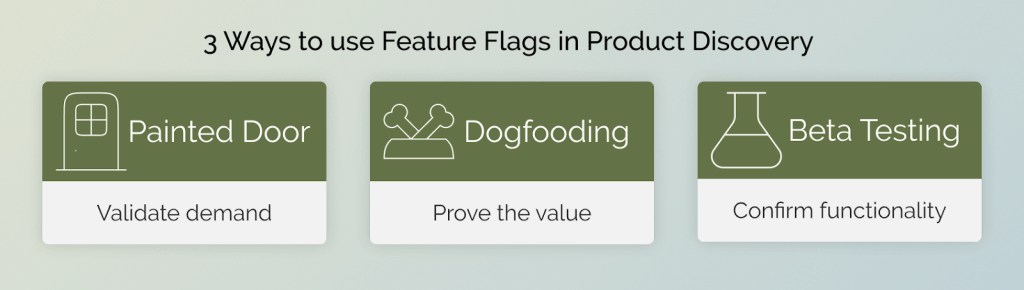
He ended up using three techniques:
Technique 1: Validate demand early
In the very first sprint, John doesn’t start with code. He starts with curiosity.
Using a feature flag, he exposes a painted door to a select group of users: a new “Pay Later with AI” button on the checkout page shown only to U.S. Chrome users with low cart values. Behind that button is a quick survey: “Would you try this feature to speed up your checkout?”
This helps John validate early demand without building any functionality. He even adds email capture to build a beta waitlist. By tying this entry point to specific user behaviors and contexts, John ensures only qualified users see it, creating a more meaningful signal.
Painted door tests are a secret weapon in technology industries (eg: gaming), and can help you save million dollar investment mistakes.
Technique 2: Dogfood for proof of value
Next, John can ask his engineers to frugally build (or he can vibe code) a working prototype, just enough to simulate the experience.
They use a flag to roll it out internally to eBay employees only. This dogfooding round provides high-quality feedback from people who know both the product and the user base.
Employees point out confusing flows, performance quirks, and missed opportunities, well before any customers are exposed. Dogfooding also helps shape a higher quality experience and demonstrates confidence in the product before full launch.
Even though the code may not be scale ready, it’s one of the fastest, most cost-effective ways to test proof of value before investing in full development. As the team learns more from feedback, they refine the prototype that’s in the wild, hardening the code over time and getting it ready to launch to an outside audience.
At eBay, some of the most ambitious AI-led reimaginings like Magical Listing (bulk listing) and Shop The Look (curated personalized outfits), began exactly this way: as lightweight internal prototypes. Tested by employees behind a feature flag, refined rapidly, and championed with proof of value, these ideas secured executive sponsorship, ran a series of experiments and scaled into high-impact features.

Technique 3: Beta testing with the right slice of users
After internal dogfooding shows promise, John’s next move is critical: real-world beta testing. Not with just any users, but with the right users.
John uses feature flags with eBay’s segmentation tools to design a targeted beta that reflects his product’s real-world challenges. Instead of releasing to a random 10%, he curates a high-signal slice to test intentionally with users who are most likely to surface edge cases (e.g. low-bandwidth environments) or usability friction (e.g. less tech-savvy users who may struggle with new flows), before scaling.
His core question: Will this new AI-powered payment method drive adoption among high-friction user groups without causing drop-offs or regulatory issues?
To find out, he uses eBay’s feature flag and segmentation tools to create a precision-targeted beta cohort that mirrors real-world complexity:
- User Type → Sellers managing high-volume transactions
- Cost Sensitivity → First-time users who may hesitate at added costs
- Behavior Archetype → Support-heavy “Complainers” likely to flag the UX flaws
- Geographic and Legal → UK users opted into experimental features under GDPR
This isn’t just a beta – it’s a smart slice, built to reveal weak spots before the feature reaches the masses. If this group of users can effectively use the feature, John will have confidence that one of the most complex scenarios is addressed, meaning simpler cases should encounter fewer challenges.
By the time John has cycled through these three techniques, he’s got a working version of his product and a much higher level of confidence that it will hit its outcomes. He’s introduced limited delays to the delivery timeline because he’s been simultaneously learning and building.
From guessing to knowing: Three forms of insight
Looking back, John didn’t need 8 sprints to prove the value of an AI-powered payments feature. By using feature flags, he validated demand using painted doors in Week 1, shipped a dogfood-ready prototype in Week 2, and got high-signal feedback from targeted beta users before writing scale-ready code.
This is exactly what we promised at the start – optimizing for quickly generating new insights and adjusting course. Instead of spending months building in the dark, John generated three types of critical insights simultaneously:
- Market demand insights from painted door testing revealed real user interest before any development
- Product-market fit insights from internal dogfooding validated the core value proposition
- User experience insights from targeted beta testing surfaced edge cases and usability issues
When it came time to roll out, he wasn’t guessing. He had data, confidence, and control.
Key takeaways from John’s journey:
- Target Intentionally: Use feature flags to ship earlier to the groups that will help you learn about core value props and potential edge cases as quickly as possible.
- Iterate Quickly: PMs and engineers should co-create, validate early and monitor continuously.
- Experimentation: The best teams don’t just release with flags, they run A/B experiments on them too, before launch and after, for continuous and cyclical learning.
This approach transforms the traditional product development cycle from sequential learning to parallel insight generation. Instead of building for months only to discover problems at launch, you’re course-correcting from day one based on real user feedback.
Feature Flags aren’t just engineering tools; they’re a product power move.
* John is a combination of several product managers I’ve worked with at eBay. The story is for illustrative purposes only.