
Building AI automations that make you better, not just faster
In a coaching last week, I bit my tongue. I was about to dive into solutions, but instead I said, “How does that change how you see yourself?”
That question opened up some real reflection in the conversation. And it’s a question that I don’t think I would have asked six months ago. I have AI to thank for it. And no, I wasn’t parroting an AI copilot.
As a coach, it’s tough to get real feedback on how I’m doing. My clients are not there to grow me; I’m there to grow them.
The reason I was able to stay in that moment of identity instead of moving out into tactics and solutions was because of the constant feedback I’ve been getting.
After each coaching call, I get a personal message from my workflow tool, walking me through things I did well and things I could improve upon in the future. It also conveniently drafts the follow-up email to the client and walks through potential LinkedIn post ideas that I could use for my social media (not disclosing client discussions, but highlighting things I mention).
Building this feedback loop has changed my behavior in the room.
As product people, we’re constantly having high-stakes conversations— user interviews, 1:1s with direct reports, stakeholder negotiations— yet feedback on how we showed up rarely comes, or arrives weeks later in a performance review. That gap in self-awareness used to be unavoidable. Now we can have the luxury of continuous, near-instant feedback.
If you’ve been using AI for one-off tasks but haven’t built automated workflows yet, you’re leaving a lot on the table. Here’s what I’ve learned so you don’t have to figure it out from scratch.
Deliberate practice in the age of AI
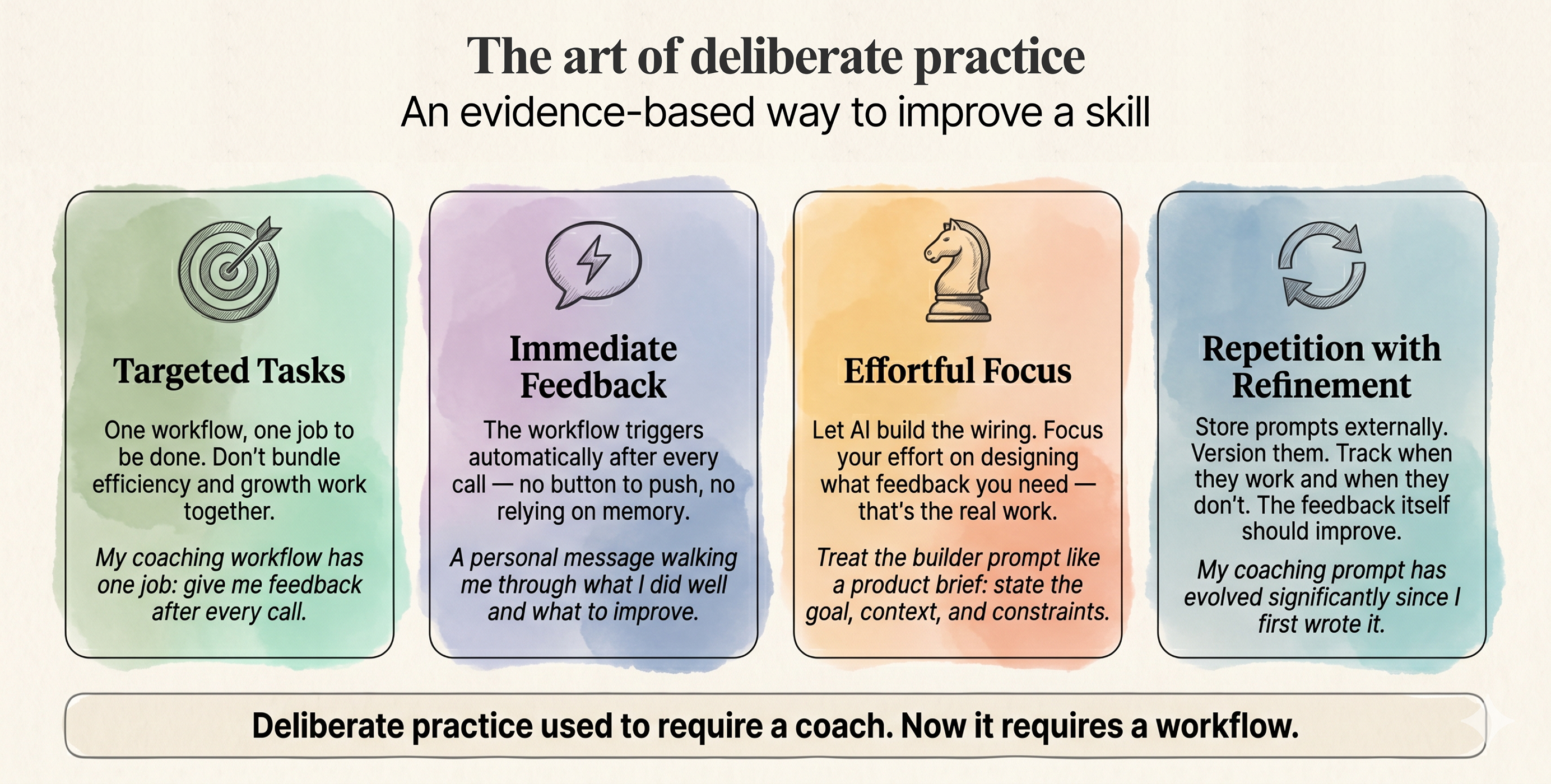
Deliberate practice, a framework coined by Anders Ericsson, is one of the most effective ways to build skill. It has four core components:
- Targeted tasks: choosing something specific to work on
- Immediate feedback: the ability to correct as soon as possible
- Effortful focus: being in your stretch zone, neither too easy nor too hard
- Repetition with refinement: each time you practice, you’re making targeted adjustments
The hardest part has always been immediate feedback — it usually requires someone with more expertise to provide an outside perspective on how to improve. Historically, this meant hiring a skills-oriented coach.
AI lets us automate that coach. Immediate feedback is now accessible to anyone willing to build the workflow. It may not be as amazing as the feedback you’d get from a real human coach, but it’s far better than nothing at all.
To make deliberate practice real, you need workflows that trigger themselves and deliver the same feedback every time—reliably, cheaply, and without you having to push a button.
When a workflow tool is the right choice
So what exactly is a workflow management tool? (and if you’re familiar with them, skip to the next section)
It’s a tool that allows you to say, “When this thing happens, then do these other things.” The other actions it can take might be AI-driven or they might be programmatic and deterministic.
They’re lighter weight than building out an app to do something and more persistent than asking an AI chat as a one-off. They run when you’re sleeping, they run when you’re not at your computer, and without needing an extra machine like OpenClaw. They have clear limits on what they can do, so won’t go rogue on you.
The persistence and boundaries matter more than you’d think. For a workflow to actually change your behavior, it needs to run consistently — every time, without you remembering to trigger it.
I use Relay.app* for my workflow management tool because it integrates easily with my existing stack. It handles AI steps cleanly, I don’t have to do too much setup of memory, and it’s really easy to iterate.
Other tools in this space include Zapier, Make, n8n, or Workato. Each has different integrations, setup complexity, and pricing.
There are plenty of great articles that help you choose a workflow management tool, so I’m not going to dig into it here. And while I will be sharing examples of how I’ve set up Relay, these could translate equally well to any of these other tools.
Disclosure: I’m a Relay affiliate, but I have been using this tool for years, well before I became an affiliate, and you should choose whichever platform best meets your needs.
Enabling the four components of deliberate practice
Use AI sparingly. Use deterministic workflows aggressively.
Deliberate practice demands consistency—you need feedback every time you perform the task and confidence that the feedback is oriented towards your goals. A workflow that behaves differently every time or costs too much won’t solve this problem.
As product managers, we know that a simple solution always beats a complicated one. Deterministic steps are simpler and more reliable than AI steps. Design your AI workflows to use as many deterministic steps as possible first, and only lean on the AI once those hit their limits.
If you lean on AI too much, you end up with prompts that say “Do tasks one, two, and three”. It ends up spending a lot of tokens and the outputs will be variable.
Instead, think about how you can feed AI stronger context and ask less of it. This saves you tokens and makes sure that your AI is actually completing the task at hand.
- Use deterministic steps for:
- moving data
- calling APIs
- known logic
- Use AI for:
- classification
- synthesis
- generation
For example: I wanted every CRM profile to have a LinkedIn URL attached. My assistant’s first draft asked Claude to web-search for each person’s profile—hundreds of tokens per run. We swapped it for a built-in LinkedIn API lookup that matches on search results. Under 20 tokens.

From there, deterministic steps handle the CRM lookup and upload. No AI required. Where do we have AI jump in? Populating the CRM with the types of topics they like to talk about, gleaned from their public posts.
The best workflow is the one that actually runs. Deterministic steps make that far more likely.
The feedback should be continuously improving
The fourth component of deliberate practice is “repetition with refinement”—each iteration should be slightly better than the last. This applies not just to what you’re practicing, but to the feedback itself. Your coaching prompt should evolve as you identify which habits matter most.
To improve the feedback I’m getting, I make sure to keep a version log of the AI prompts I use.
In practice, this means I never put the prompts directly in the tool. Instead, I store them in a third-party platform and have the tool look up the prompt. This allows me to quickly iterate, keep track of versions, and make sure that my AI is actually improving over time.

When I kept the prompt in the tool instead, I ended up duplicating the prompt across workflows, which meant keeping track of more versions. I then made an edit. The output got worse, and I couldn’t figure out how to undo.
For instance, I have a style guide that I use to make sure the AI can write like me. All of my writing workflows refer to this single guide. If I kept the prompt in the workflow itself, I’d have to manage it in multiple places.
By having it in Coda and clearly versioned, I can track and edit my writing guide in one place and know it will be updated everywhere. I can then track when prompts work, when they fail, and what changes actually improved them.
My coaching feedback prompt has evolved significantly since I first wrote it. As I refined it, I got clearer on which habits matter most—staying in the moment, asking identity questions, resisting the urge to jump to tactics. I’ve customized the prompt to make sure that I’m getting high-quality feedback unique to my goals.
This also touches on the deliberate practice pillar of targeted tasks. I’m not trying to become a better generic coach. I’m trying to become the best coach I am uniquely suited to become.
Know your Job To Be Done, singular
Deliberate practice requires choosing something specific to work on. A mega-workflow that handles everything is like a product doing too many things at the same time. It can do it, but it’s hard to stay focused and make sure you’re really hitting the most important goal.
Each workflow needs a clear job to be done. My coaching feedback workflow has one job: provide me personalized feedback after every call to help me improve my craft.
If you don’t have a clear job to be done, you end up with a mega-workflow that’s unwieldy. I started with a single post-meeting follow-up workflow. It managed meeting notes, LinkedIn posts, coaching feedback, client follow-ups, and a few other administrative tasks. It became a mess — lots of conditional logic about when to run one thing versus another and how to handle edge cases.
I had lost track of the job to be done.
I recently refactored it into several separate workflows:
- a marketing workflow
- a coaching workflow
- an administrative workflow
Though the trigger was the same (a meeting ending), each workflow needed different context and had a different purpose. Separating them made each one easier to manage and improved the outputs.
The coaching workflow was about growth; the administrative one was about efficiency. Bundling them meant I kept optimizing for speed when I should have been optimizing for insight.
Efficiency jobs and growth jobs are best kept separate. Drafting follow-up emails is an efficiency job — it saves me time. Getting feedback on my coaching is a growth job — it makes me better. When they’re tangled together, I have more trouble staying focused on the real value the workflow is giving me.
Let the tool build the workflow so you can focus on what matters
Effortful focus means operating in your stretch zone—working on the hard thing, not the tedious thing. Building workflow logic step-by-step is tedious. Designing what feedback you need and how to structure your practice is the actual work.
As these tools have advanced, they’ve added AI builders directly into the workflow tool itself. You can now vibe code your workflows.
Treat the builder prompt like a product brief: state the goal, key context, and constraints, then let the tool draft the steps. Its success or failure becomes your immediate feedback loop on the brief—and keeps your effort on the hard thinking, not the wiring.

I’ve started doing this with Relay, and it’s far better and faster at designing workflows than I am. I use it to iterate quickly on edge cases and architecture instead of hand-building logic blocks.
Because building is faster, I’ve been able to add far more workflows focused on growth — not just efficiency. Workflows I never would have built if I had to construct them step by step.
Start with the feedback you wish you had
If you’re looking to use workflows not just to move faster, but to actually get better at your craft, think about the areas where you need immediate feedback. As a PM, perhaps you’re working on your executive presence or user interviews.
For me, hiring a coach to review my coaching calls would mean a few calls reviewed every so often — hardly immediate or consistent. That’s why I targeted this as one of my core workflows.
I have similar workflows for sales calls and one that reviews my LinkedIn post performance. These are all feedback loops that wouldn’t have been cost-effective without AI.
The feedback compounds. As I’ve gotten better at staying in the moment during coaching calls, I’ve started getting feedback about new areas to grow — areas that weren’t visible until I’d improved the basics. I can now update my prompts to talk about where I’m at and where I’m trying to go next. That’s how deliberate practice works: each level unlocks another.
The more we invest in our craft, the closer we get to becoming the product manager they always dreamed of — the elusive PM who can actually do it all.
More automation frees up our time. More immediate feedback makes us better at using the time we invest. We don’t need more workflows creating slop, we need workflows that help us get better at our craft.